Phone Apps & Features You’ll Use in Bali: My Practical Guide (2027)
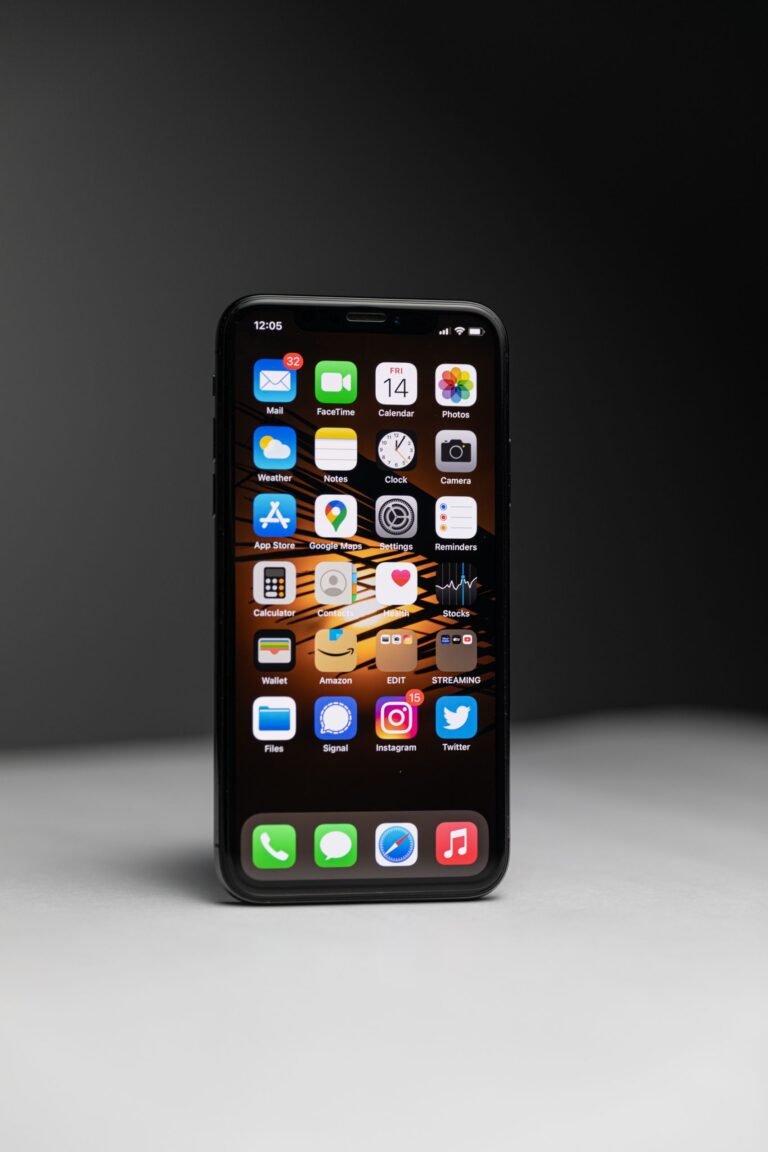
Before you download another five travel apps for Bali, have a look at the ones already on your phone. Some of the most useful travel tools are probably sitting there waiting to be used. Your calculator can help you make sense of prices in Indonesian rupiah, Google Maps can help you plan your days and your phone can translate a menu or store important details for offline access.
The trick isn’t simply knowing these features exist. It’s knowing how to set them up and, perhaps more importantly, what not to trust them with. Bali is one of those places where a journey that looks beautifully simple on a map can take much longer than you expect, and getting the settings right makes a real difference.

1. Turn your iPhone Calculator into a currency converter
If you’ve got a recent iPhone, you may not need a separate currency conversion app at all. Apple’s Calculator has a built-in conversion tool, so you can switch between Indonesian rupiah (IDR) and your home currency while you’re shopping, comparing restaurant prices or deciding whether a tour is worth the money. I love anything that helps you understand a price without doing mental arithmetic every time someone says a number in the hundreds of thousands.
How to set it up on iPhone
- Open the Calculator app.
- Tap the Change Mode button, top right then select Convert.
- Tap the unit or currency selector and choose Indonesian Rupiah (IDR) for one side.
- Choose your home currency for the other side, such as AUD, GBP or USD.
- Type a price in either field to see its equivalent. Use the swap button (two arrows) if you’d prefer to enter amounts in the opposite direction.
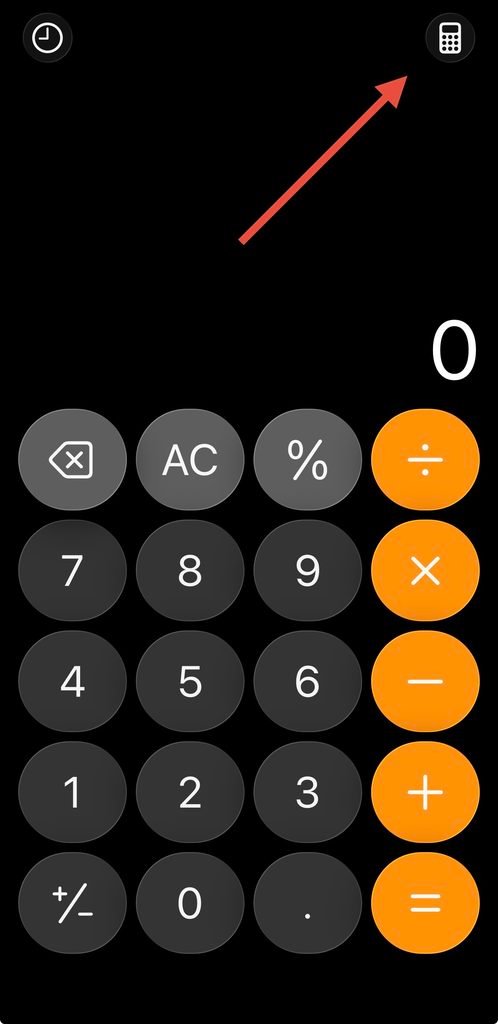
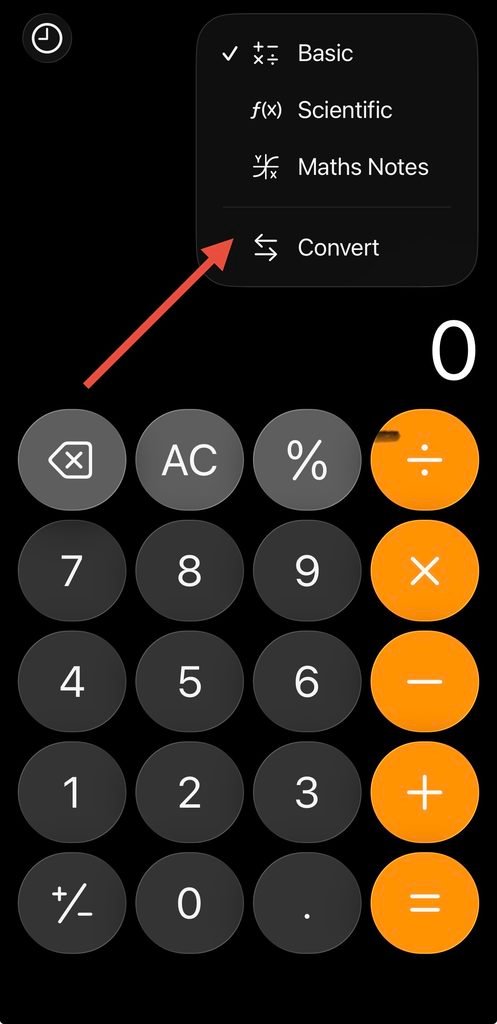
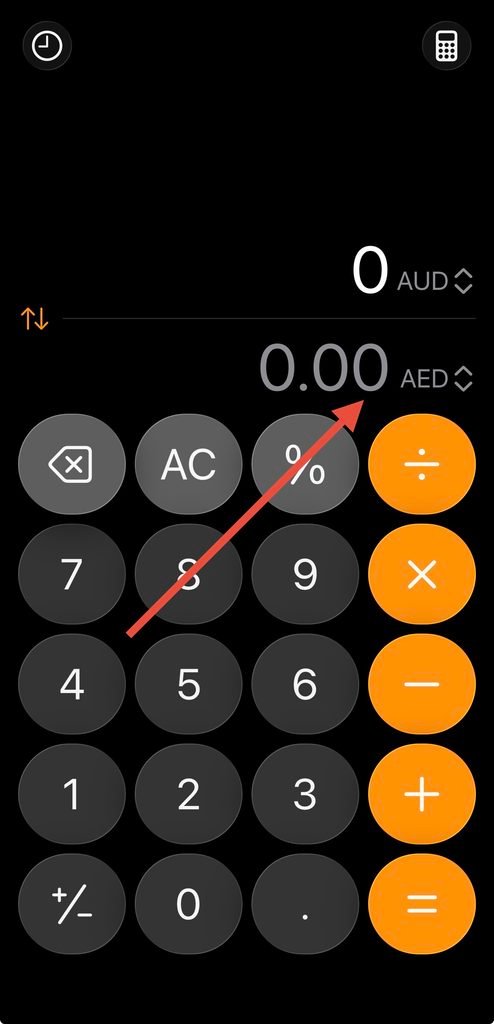
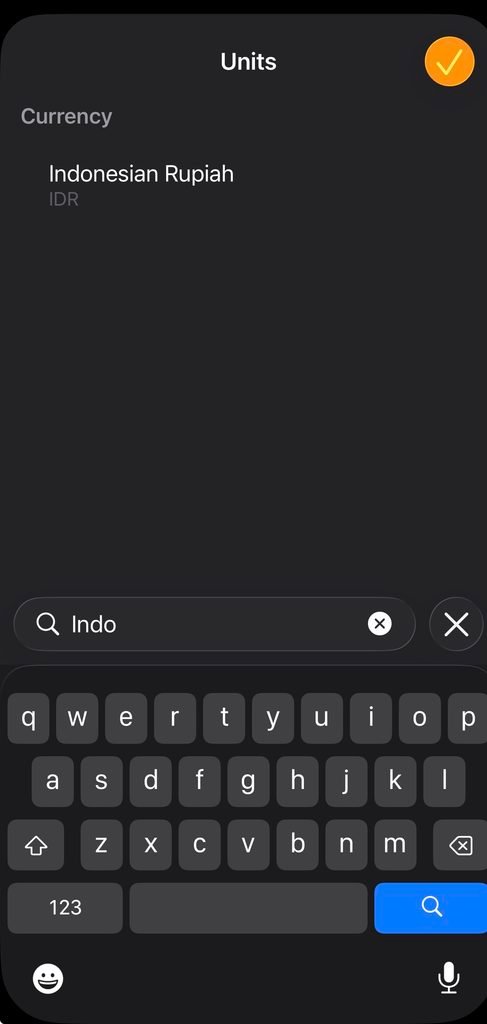
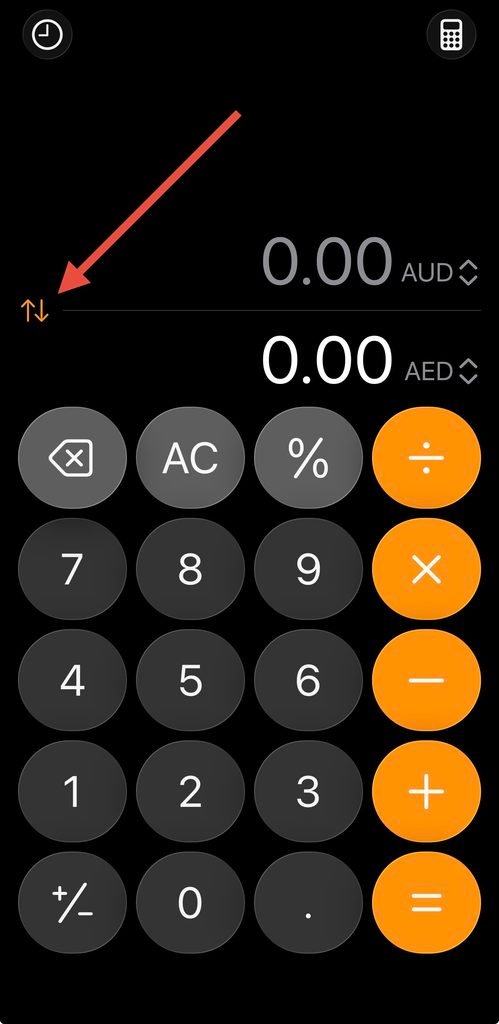
Once it’s set up, you can use the calculator as a quick reference for things such as a restaurant bill of Rp 350,000 or a driver quoting a price in rupiah. It’s worth remembering that the conversion displayed is only a guide. Your bank, card provider, ATM or money changer might use a different rate and charge fees, so the exact amount that leaves your account may vary.
These steps are for the iPhone Calculator feature; menus can vary with your iOS version. If you’re using Android, look for a currency converter already available on your device or use a reliable search for an IDR conversion. Don’t assume every Android Calculator includes the same feature.
2. Google Maps — the app I use, but never trust blindly
Google Maps is incredibly useful in Bali, but I would be careful about treating its driving times as a promise. Roads can be narrow, traffic builds quickly, and a trip that seems manageable when you’re planning from home may feel very different once you’re sitting in a car. It’s still one of the first tools I open when deciding where to stay or grouping activities together; I just give myself more time than the app sometimes suggests.
The setting you must check: car versus motorcycle
This is a particularly important one in Bali. Google Maps offers a separate two-wheeler mode in supported locations, and those routes may use narrow lanes or shortcuts suitable for scooters rather than cars. If the app has remembered a motorcycle setting or offers that mode first, you can end up looking at a much faster journey than the one your family will actually take in a car.
- Open Google Maps and search for the place you want to visit.
- Tap Directions.
- Look at the transport icons near the top of the screen and explicitly select Driving (car), not the motorcycle/two-wheeler icon.
- Check both the suggested route and estimated duration before using it to plan your day.
- If you’re planning several stops, check each leg separately and allow extra time for traffic, parking and getting in and out of the car.
I would do this every time you’re comparing hotel locations or working out whether two activities belong in the same day. Motorcycle shortcuts are not necessarily suitable for your driver, and even car estimates are only estimates that are often wrong. If a route looks suspiciously quick, check the transport mode again before making a booking.
Save the important places before you arrive
Google Maps becomes much more useful when you’ve already saved your hotel, a few restaurants and the main activities you want to visit. Open a place listing, tap Save and add it to an existing list or create a new list for your trip. You can make separate lists for places to eat, things to do and accommodation, or keep everything together in one Bali holiday collection.
I also recommend checking the pin against the business’s official address and recent reviews, particularly for smaller villas and attractions. A listing may point to the wrong entrance, and a route that ends at a lane or side road isn’t always the route a car should take. When you’re unsure, send the Google Maps pin to your hotel or driver on WhatsApp and ask them to confirm the best access point.
Download a Bali map for offline use
- Open Google Maps while connected to Wi-Fi and signed in.
- Tap your profile picture, then choose Offline maps.
- Select Select your own map and move or zoom the box over the area of Bali you’ll visit.
- Tap Download and wait for it to finish before you leave home.
Offline maps are a useful backup if your connection drops, but they aren’t a full replacement for live navigation. Traffic information and alternative routes may be limited when you’re offline. If you’re travelling across more than one region of Bali, check that the downloaded area includes all your destinations, not just the neighbourhood around your first hotel.

3. Use Google Translate or your phone’s translation tools
You don’t have to speak Indonesian to have a wonderful holiday in Bali, but being able to translate a short message, menu or sign can be surprisingly helpful. Google Translate is handy because it can translate typed text and, on supported devices, use the camera to interpret text in front of you. Some phones also have built-in translation features, so it’s worth checking what you’ve already got installed.
How to prepare your translation app
- Open Google Translate or your phone’s built-in translation app.
- Choose Indonesian and your preferred language.
- Download any available offline language packs before your trip.
- Practise typing a short phrase or using the camera translation feature so you know where to find it later.
I wouldn’t rely on machine translation for medical instructions, food allergies or anything where getting the meaning wrong could be dangerous. For those situations, get help from a qualified professional or someone who can communicate reliably in both languages. For everyday questions, though, a translation tool can make small interactions much easier.
5 Indonesian Words to Know Before Visiting Bali 🇮🇩
You don’t need to speak Indonesian to enjoy Bali, but learning a few simple words goes a long way. Bahasa Indonesia is widely spoken across Bali, alongside the local Balinese language.
| Indonesian | Meaning | Pronunciation |
|---|---|---|
| Terima kasih | Thank you | Tuh-REE-mah KAH-see |
| Tolong | Please / Help | TOH-long |
| Permisi | Excuse me | Per-MEE-see |
| Berapa? | How much? | Buh-RAH-pah |
| Enak | Delicious | EH-nak |
4. Use your phone’s Notes and Wallet for the important details
One of the simplest things you can do before travelling is create a single holiday note with the details you’ll need when you arrive: your hotel name and address, transfer arrangements, booking references, your insurer’s assistance number and any important contacts. Save copies of essential documents in a secure place you can access offline, and use your phone’s Wallet for boarding passes or tickets where supported.
I would also share the practical travel information with another adult in your group rather than keeping everything on one device. Phones get lost, batteries run flat and mobile data doesn’t always cooperate. If you’ve already downloaded my free Bali Emergency & Medical Guide, this is a good time to save it somewhere easy to find.
5. Do you need a VPN in Bali?

A VPN isn’t something every traveller has to buy, but it’s worth considering if you’ll be connecting to hotel, airport or café Wi-Fi regularly, particularly if you’re doing work or accessing accounts while travelling. A reputable VPN encrypts the connection between your device and its server, which can add protection against people observing traffic on an untrusted local network. It doesn’t make you anonymous, stop every scam or replace safe browsing habits, but it can be a useful additional layer.
Surfshark is one provider you could compare. It has apps for phones and computers and offers connection settings such as auto-connect. You don’t need a VPN just to browse ordinary websites on holiday, and it can sometimes slow your connection or interfere with services that rely on your physical location, so I’d treat it as an optional travel tool rather than an essential purchase especially if you plan on accessing personal platforms using passwords or internet banking.
How to set up a VPN before travelling
- Choose a reputable VPN provider, compare its current plans and read its privacy policy.
- Download the official app from the relevant app store and create your account before you fly.
- Open the app and follow the steps to allow a VPN configuration on your device.
- Connect to a suitable server and check that your internet still works normally.
- If your provider offers auto-connect, consider enabling it for unfamiliar networks. Revisit the setting if an app or website behaves unexpectedly.
Be particularly careful with free or unfamiliar VPN apps that make unrealistic promises. And remember that a VPN does not protect you if you voluntarily enter your password into a fake website. Keep your device updated, use strong passwords and two-factor authentication, and avoid banking on a shared device.
Before you fly: my quick phone check
I would spend ten minutes setting these features up while you’re still at home. Check that your currency converter is using IDR, save the places you want to visit in Google Maps, download offline maps, prepare a translation tool and make sure your hotel and emergency contacts are easy to find. If you decide to use a VPN, install it at home and test it before leaving the airport Wi-Fi behind.
And don’t forget the apps that make booking and everyday life in Bali easier. I’ve also put together a guide to the five apps to download before your Bali holiday, including WhatsApp, Wise, Airalo, Gojek and Grab.
If you’re still pulling your trip together, my free Bali itinerary planning tools can help you group activities geographically, and the Bali Budget Calculator is useful for working out what the whole holiday might cost. Getting a few small things organised on your phone now means less time troubleshooting once you’re in Bali.